Music Collecting: Tags and Gain
Published by ambalek on
Organising your music files.
Last year I write about using music without streaming services, and I've discovered a few more small things since then to do with maintaining a music collection. My current setup is based around a NAS, and I like to copy music to SD cards to play on portable music players, or use Sonos to play through speakers.
Better Quality Tags
Sometimes, I have no idea why, but legit DRM-free music I've purchased through iTunes, Amazon, and Bandcamp, can have messy tags that confuses music players. The album might show up as duplicated in an "albums" view, or songs and artists aren't named consistently and correctly.
MusicBrainz Picard
One way to fix bad tags is using MusicBrainz Picard. The way I like to use it is by dragging in an album at a time, seeing what matches it generates, then selecting the release I think is the correct one. Sometimes a few tracks aren't matched, so I'll drag those ones to the corresponding entry in the release I've chosen, and eventually I get the gold disc icon that means the release is 100% matched.
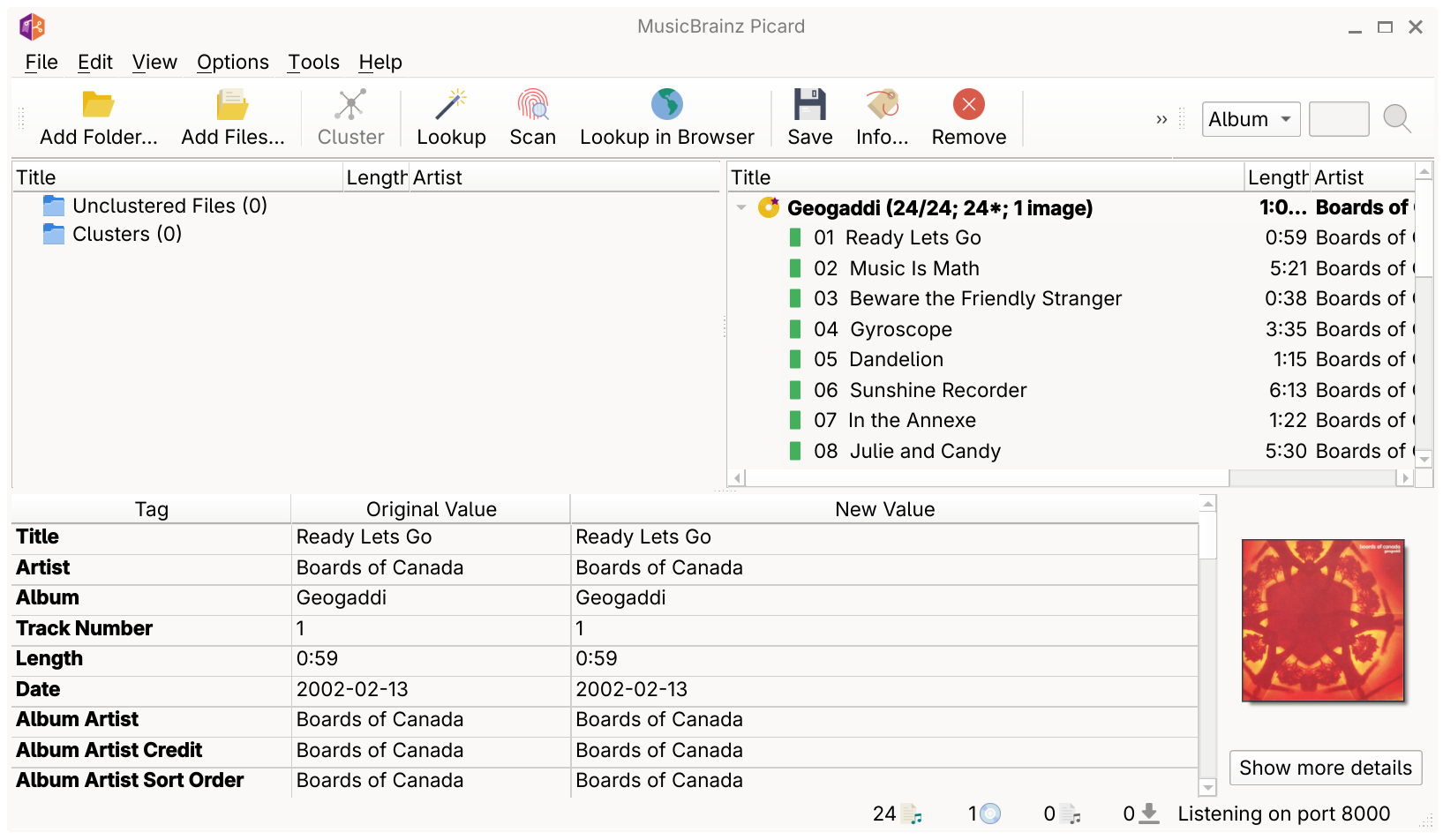
Saving in Picard will update the files, but it also
embeds custom MusicBrainz* tags. Some music
players prefer these tags and it helps them better
organise music.
One thing I enjoy about this process is seeing what other releases of an album exist, and the different track listings. For rock/metal/etc that usually means live tracks, which can be interesting, but there are rarities included in some releases that are fun to discover. I've even got iTunes and Amazon albums with platform-specific bonus tracks, so it's not unique to physical releases. I think in the streaming era I forgot bands did bonus tracks, and it reminded me of how jealous I was of a friend who had the Japanese The Bends which I think had How Can You Be Sure and Killer Cars.
ReplayGain
Another level of polish you can add to your digital collection is ReplayGain, which is a way to help players gain match audio files. ReplayGain works by embedding yet more tags that include gain offsets for audio files. There's an offset for the track itself, and also one for the album. Using the album gain means songs have the correct gain within the context of their album — the example I read was a ballad still being quiet next to the other songs in the album, to preserve the author's intent.
The tool I'm using to add RG tags is
rsgain. It's a command-line program, and the way I use it is
just rsgain easy /path/to/my/music. It runs
recursively, so it'll update the tags of the entire
collection in one go. I haven't tried hardware/portable
music players with ReplainGain enabled, but my desktop
players support it.
An additional detail to ReplayGain is peak: the dB offset for a track/album is generated, but it also tracks a value for the album/track peak. This means your player shouldn't play anything too loud and distort, so it feels like a pretty good approach as far as I understand these things.
Music Unknown to Metadata Services
Some of the albums that I've listened to for many years were not matched by MusicBrainz or any other services I tried. The funny thing is they were sold by iTunes/Amazon, so I think the coverage for digital releases isn't 100%.
With one particularly stubborn release I had to manually edit the tags. The core problem was it's a compilation, and wasn't tagged that way, and I don't want all of the artist names individually listed in the artist list in my music players. I eventually got the album name edited so it was the same for every file, and set a compilation flag, and all was well.
For editing tags, I found Kid3 - Audio Tagger and easytag to work. These sorts of programs usually treat music as folder-based, so you select a folder and they'll parse the id3 tags for each music file in that folder.
Some of these programs are better than others. I found issues with certain tools not showing specific versions of id3tags, or fields I just couldn't surface that I knew were there (and confusing one of my players). The one I found the most friendly and to show the fields I needed to edit reliably was Mp3tag, which I think is only available for macOS.
I also concocted a ridiculous Python script that added album art to all of my music, but I later found One Tagger, which might be a safer way of doing that sort of thing.
Anyway…
Take a look at tidying your music file tags, and experiment with gain offsets embedded with ReplayGain. It can make your collection feel more coherent and pleasant to explore, and if you're using portable or hardware music players to amp up fancy headphones it's worth it.